Url Trackers
Date: 6/16/23 Author: B
HackedParenting is reader supported and ad-free.
We will never sell your data, however, may earn a commission when you buy through links in our site.
Have you ever wondered how websites gather information about your online activities? There are a variety of methods, but today we will specifically discuss URL trackers. These are small bits of information added to the end of a URL. Why do organizations use them? How do they affect your privacy? Let’s find out.
URL trackers are a type of parameter appended to the end of a website address. You’ve probably seen them in use on various search pages. For instance, if browsing for umbrellas on Amazon, your URL may appear as: https://www.amazon.com/s?k=umbrellas. At a high level, URL trackers provide information like how you interact with the website or where you received their URL. Much like the search example, they comprise key-value pairs like “tracker1=google.com&tracker2=123456”.
Where are they used?
-
Web Analytics - Tracking URLs can help websites understand which pages users most frequently visit, where they came from, and how they navigate the website. This kind of information helps improve website layout and identify performance issues.
-
Campaign Tracking - Marketers can use URL trackers to identify which campaigns, ads, or sources generate the most traffic or conversions.
-
Affiliate Marketing - Affiliate marketing programs allow individuals or websites to earn commissions by promoting products or services through unique tracking links.
-
A/B Testing - Web designers often test multiple versions of a website before finalizing its design. The website will serve users with these different versions and monitor how they interact with each version. URL trackers are one means to determine which version of a site a user is visiting.
Privacy Considerations
Despite their legitimate legitimate usages, you may have concerns about how URL trackers affect your privacy and security. They can provide detailed information on your browsing habits, other sites you frequent, or even link you to other users.
For instance, generating a product URL via Amazon’s iOS application generates a short URL like https://a.co/d/1bCd3d2. Navigating to this URL will take you to the product with a tracking parameter appended to the URL: https://www.amazon.com/dp/B073Q3FK8B?ref_=cm_sw_r_apin_dp_12345678890. Amazon, in theory, could use this tracker to identify who you’ve shared the URL with.
Mitigating Privacy Concerns
There are a few methods of removing URL trackers, but keep in mind doing so may break your experience with certain sites.
-
Browser Extensions - Browser extensions such as ClearURLs can automatically remove URL trackers from your requests.
-
Browser Privacy Settings
-
Safari - Will automatically remove URL trackers when using Private Browsing mode in iOS 17 and MacOS Sonoma.
-
Firefox
-
Navigate to Settings > Privacy & Security or enter
about:preferences#privacyin your address bar -
Enable either Strict or Custom
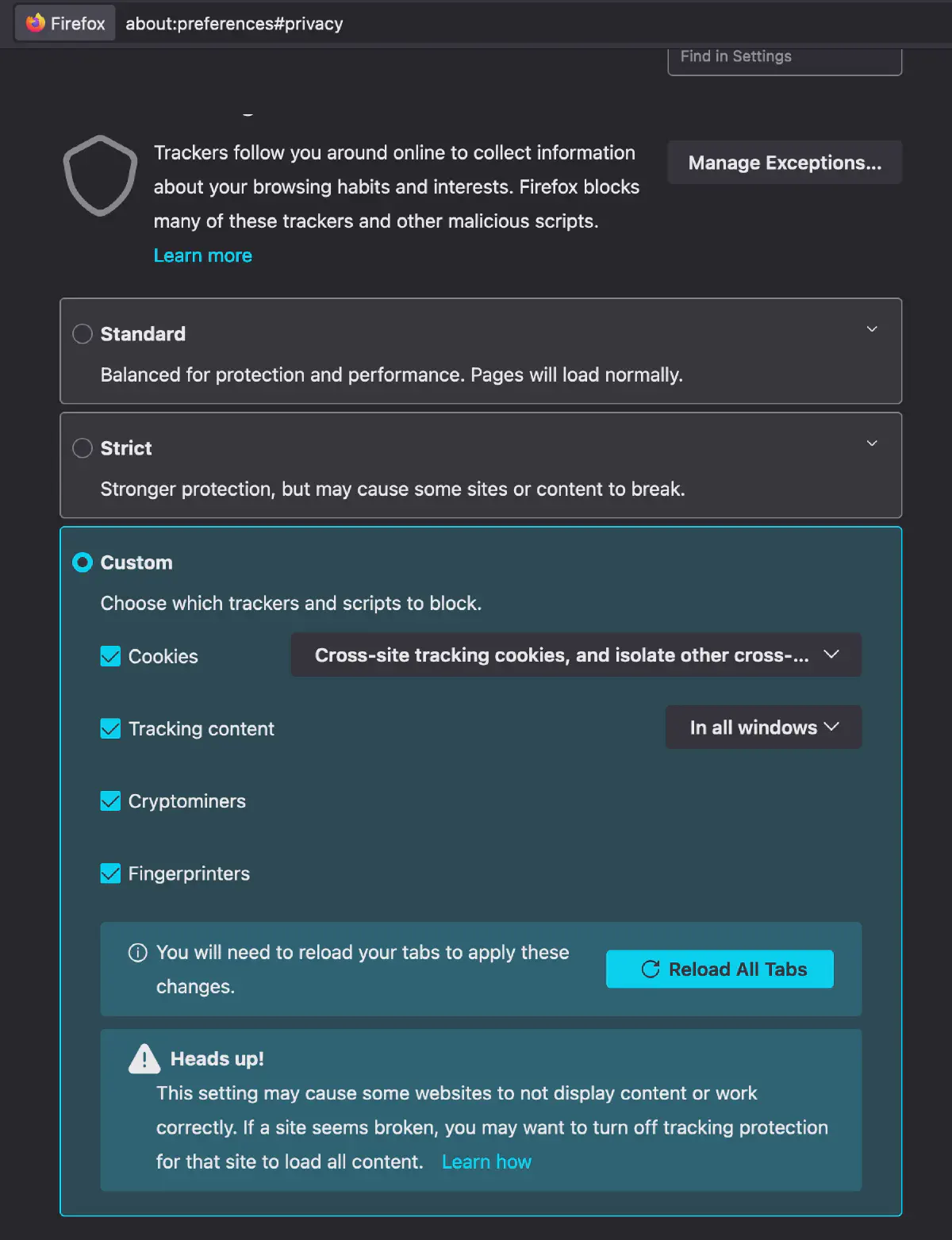
Modifying Firefox privacy settings to automagically remove URL trackers
-
-
Chrome - Check back for updates
-
-
Manual Modification - Can manually remove tracking parameters from the end of URLs (note: if the URL no longer works, you may have removed the wrong parameter).
-
Some sites provide shortened URLs like bit.ly/abcdefg, in these cases you cannot directly remove the tracking parameters
-
Sites like Unshorten.me can provide you with the original URL
-
What else
URL trackers are not inherently bad, and they’re going to be around for a while. This is just one method websites use to track you among many. There are a few general purpose privacy extensions such as PrivacyBadger and UBlock Origin to help with other methods of tracking. Whatever you choose to do about URL trackers, make sure you do it consistently across all your devices. Doing so can help you navigate the web while taking some control back over your privacy.